Setup
Create a new Base using the code below.
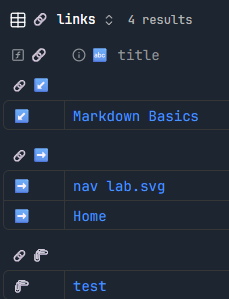
Result
This will give you a list of all notes that are linked to the current one. It will group the results by the link direction.
- Bidirectional (incoming and outgoing)
- Outgoing only
- Incoming only
Of course, you can duplicate the view and filter for only one of the link types.
Code
filters:
  and:
    - file.name != this.file.name
formulas:
  rank: if(file.hasLink(this) && this.file.hasLink(file), 0, if(file.hasLink(this), 1, 2))
  icon: if(file.hasLink(this) && this.file.hasLink(file), "🖇️", if(file.hasLink(this), "↙️", "➡️"))
properties:
  formula.icon:
    displayName: 🔗
  file.name:
    displayName: 🔤 title
views:
  - type: table
    name: 🔗 links
    filters:
      or:
        - file.hasLink(this.asLink())
        - this.file.hasLink(file.asLink())
    groupBy:
      property: formula.icon
      direction: ASC
    order:
      - formula.icon
      - file.name
    sort:
      - property: formula.rank
        direction: ASC
    columnSize:
      formula.icon: 61
Source
- Obsidian Bases Made Simple - Visual Use Cases
- See it in action: YouTube