Setup
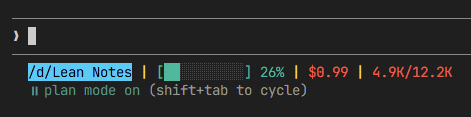
The custom status line consists of two parts: a bash script that formats the output, and a settings entry that tells Claude Code to run it.
- Create the script file at
~/.claude/statusline-command.shand paste the bash script from the Code section below - Add the
statusLineblock to your~/.claude/settings.json(see the JSON snippet below) - Restart Claude Code
Result
The status line appears at the bottom of the Claude Code terminal and shows:
- Your current working directory
- The active git branch (if in a repo)
- A visual context usage bar that changes color (green → yellow → red) as you use more context
- Estimated session cost in USD (model-aware: Opus, Sonnet, Haiku)
- Token counts (input/output) with K suffix formatting
Code
settings.json
Add this block to your ~/.claude/settings.json. Adjust the path to match where you saved the script.
{
  "statusLine": {
    "type": "command",
    "command": "bash ~/.claude/statusline-command.sh"
  }
}
statusline-command.sh
Save this as ~/.claude/statusline-command.sh.
#!/usr/bin/env bash
# Claude Code status line script
# Shows: path | branch | ctx% | tokens (in/out) | $cost

input=$(cat)

# Simple JSON value extractor using grep+sed (no jq needed)
json_val() {
  echo "$input" | grep -o "\"$1\"[[:space:]]*:[[:space:]]*[^,}]*" | sed 's/.*:[[:space:]]*//' | sed 's/[" ]//g'
}

# Extract cwd - handle Windows paths which contain backslashes and colons
# Match the quoted string value specifically (handles D:\foo style paths)
cwd=$(echo "$input" | grep -o '"cwd"[[:space:]]*:[[:space:]]*"[^"]*"' | head -1 | sed 's/.*:[[:space:]]*"//' | sed 's/"$//' | sed 's/\\\\/\\/g')

# Convert Windows path (D:\foo) to Unix path (/d/foo) for git
if [[ "$cwd" =~ ^([A-Za-z]):[/\\] ]]; then
  drive="${BASH_REMATCH[1]}"
  drive_lower=$(echo "$drive" | tr 'A-Z' 'a-z')
  cwd="/$drive_lower${cwd:2}"
  cwd="${cwd//\\//}"
fi

# Shorten home directory to ~
home="$HOME"
display_dir="$cwd"
if [ -n "$home" ] && [ -n "$cwd" ]; then
  display_dir="${cwd/#$home/\~}"
fi

# Git branch
git_branch=""
if [ -n "$cwd" ] && git -C "$cwd" rev-parse --git-dir > /dev/null 2>&1; then
  git_branch=$(git -C "$cwd" --no-optional-locks symbolic-ref --short HEAD 2>/dev/null)
  if [ -z "$git_branch" ]; then
    git_branch=$(git -C "$cwd" --no-optional-locks rev-parse --short HEAD 2>/dev/null)
  fi
fi

# Context usage percentage
used_pct=$(json_val used_percentage)

# Token counts
total_input=$(json_val total_input_tokens)
total_output=$(json_val total_output_tokens)
total_input=${total_input:-0}
total_output=${total_output:-0}

# Model-aware cost estimate (per-million token rates)
model_id=$(json_val id)
case "$model_id" in
  *opus-4*)
    rate_in=15; rate_out=75 ;;
  *sonnet-4*)
    rate_in=3; rate_out=15 ;;
  *haiku-3-5*)
    rate_in=0.8; rate_out=4 ;;
  *haiku*)
    rate_in=0.25; rate_out=1.25 ;;
  *)
    rate_in=3; rate_out=15 ;;
esac

cost=$(awk "BEGIN { printf \"%.2f\", ($total_input * $rate_in / 1000000) + ($total_output * $rate_out / 1000000) }")

# Format token counts with K suffix
fmt_tokens() {
  local n=$1
  if [ "$n" -ge 1000 ] 2>/dev/null; then
    awk "BEGIN { printf \"%.1fK\", $n / 1000 }"
  else
    echo "$n"
  fi
}

in_fmt=$(fmt_tokens "$total_input")
out_fmt=$(fmt_tokens "$total_output")

# ANSI 24-bit colors
c_path='\033[38;2;0;0;0;48;2;37;208;247m'      # black on #25D0F7
c_sep='\033[38;2;255;215;0m'                     # #FFD700
c_branch='\033[38;2;255;255;255;48;2;252;54;52m'  # white on #FC3634
c_metric='\033[38;2;252;54;52m'                   # #FC3634
c_reset='\033[0m'

# Build status line
result="${c_path}${display_dir}${c_reset}"

if [ -n "$git_branch" ]; then
  result="$result ${c_sep}|${c_reset} ${c_branch}${git_branch}${c_reset}"
fi

if [ -n "$used_pct" ]; then
  used_rounded=$(awk "BEGIN { printf \"%.0f\", $used_pct }")
  # Color thresholds: green < 50%, yellow 50-79%, red >= 80%
  if [ "$used_rounded" -ge 80 ] 2>/dev/null; then
    fill_color='\033[38;2;252;54;52m'   # red #FC3634
    dim_fill='\033[38;2;126;27;26m'     # dim red
  elif [ "$used_rounded" -ge 50 ] 2>/dev/null; then
    fill_color='\033[38;2;255;215;0m'   # yellow #FFD700
    dim_fill='\033[38;2;128;108;0m'     # dim yellow
  else
    fill_color='\033[38;2;24;188;156m'  # green #18BC9C
    dim_fill='\033[38;2;12;94;78m'      # dim green
  fi
  # Build a 10-character visual bar using filled/empty block characters
  filled=$(awk "BEGIN { n = int($used_pct / 10); if (n > 10) n = 10; printf \"%d\", n }")
  empty=$((10 - filled))
  bar_filled=""
  bar_empty=""
  for i in $(seq 1 $filled); do bar_filled="${bar_filled}█"; done
  for i in $(seq 1 $empty); do bar_empty="${bar_empty}░"; done
  result="$result ${c_sep}|${c_reset} ${fill_color}[${bar_filled}${dim_fill}${bar_empty}${fill_color}]${c_reset} ${fill_color}${used_rounded}%${c_reset}"
fi

result="$result ${c_sep}|${c_reset} ${c_metric}\$${cost}${c_reset}"
result="$result ${c_sep}|${c_reset} ${c_metric}${in_fmt}/${out_fmt}${c_reset}"

printf '%b' "$result"