In a Nutshell
The Short Version
- Problem: AI makes output cheap, but judging it is not
- Symptom 1: Overproduction, you cannot choose
- Symptom 2: Almost right, you cannot trust
- Cause: No harness (context + guidelines)
- Fix: Build the harness once, then reuse it
- Start: One recurring task, three rules, two examples, a short glossary
Most people use AI regularly, yet many do not feel more productive. AI makes it effortless to produce outputs (text, images, documents, software), but it shifts the burden from producing to verifying and judging, making it harder to focus on the outcome. Faster is not better.
Two symptoms show up again and again:
- you cannot easily choose between many plausible outputs, and
- you cannot fully trust any of them.
Both have one cause. The AI is missing your context and your guidelines, which together form a harness.
What is a harness? A harness is the context (background, audience, terms) and the guidelines (rules, format, reference examples) you set up once around an AI tool, so it starts from your standard instead of a generic average. It needs no code, only a few well-written documents.
This post explains
- the problem,
- the six levels of working with AI,
- and a three-question framework (Why, How, What) for building a harness once instead of re-explaining yourself every time.
The Problem: Output Is Not Outcome
AI has lowered the effort of producing content to almost zero. That shifts the burden to a different place: deciding which result is good enough and whether it is correct.
Symptom 1: Overproduction
In lean production, overproduction (making more than the next person needs) is considered the worst of the seven wastes. AI makes it effortless.
Say you need a recurring (weekly or monthly) status report. You ask an AI tool for it to save 30 minutes of manual writing. What happens next is predictable. It creates multiple versions in a matter of minutes. But none of them is what - or how - you need it to be.
- Version one is a bit stiff.
- Version two is too cheerful.
- Version three is too long.
- Version four is short, but reads like a ransom note.
- Version five is fine.
- Version six exists because version five made you doubt version two.
Now you need an hour for deciding which one to use and to verify it. Output went up. The outcome (one correct report that does its job) did not. You did not save the 30 minutes, and next month - or week - the same cycle starts again.
Before AI, you had one draft and it was yours. You knew where the data came from and how reliable it was. Now you are the editor-in-chief of several equally plausible versions written by someone else.
Knowledge workers were trained to produce reliable outcomes, not to choose between six outputs they did not write. Choosing can take longer than writing, especially when versions are generated faster than you can read them.
Symptom 2: The Almost-Right Trap
Each report looks clean, confident and fluent. Whether they are correct is a separate question. Nothing looks broken, and that is the danger.
"Almost right" ...
… is the most dangerous kind of wrong.
You can trust AI and send a confidently wrong report faster than ever, or you can check its data sources and structure. Most people do both: they check some of it and hope about the rest. Increasingly, the recipients do not read the report either. They summarize it … with AI.
Efficient is not the same as effective, and looking right is not the same as being right. Nothing is worse than doing the wrong thing, except doing it repeatedly and ever faster.
Why AI Output Is Almost Right: The Missing Harness
Can’t choose and can’t trust are two sides of the same coin. Both are about judging, and judging consistently requires a standard. In the status report example, two things were missing.
- Context: what slipped last week, what the risks are, what decision the report supports, who the target audience is - all the little things happening in real life that AI simply does not know.
- Guidelines: how you want it done; a specific format such as three bullets and one number instead of long prose paragraphs, your tone, and your quality standards.
All of this lives in your head. AI does not know it and instead of asking, it fills the gap with the most plausible output, which is the average status report in the world: fluent, polished … and not necessarily true.
Context plus guidelines is a harness. In technical circles, “harness” means the software around a model (the loop, the tools, the memory). The end-user version used here is simpler: the context and guidelines you set up around the AI so it works the way you need. It requires no code, only a few well-written documents.
Without one, you are the harness. You choose between versions, check every line, paste in background, regenerate, and repeat next month.
With one, the AI starts from your standard instead of the average. It will not be perfect and you still check, but the odds of a correct result are higher, so you review less and trust more.
The Ladder: Six Levels of Using AI
Most people sit between levels two and three. This is an observation, not measured data. The six levels are the Asker, the Delegator, the Prompter, the Curator, the Automator and the Orchestrator.
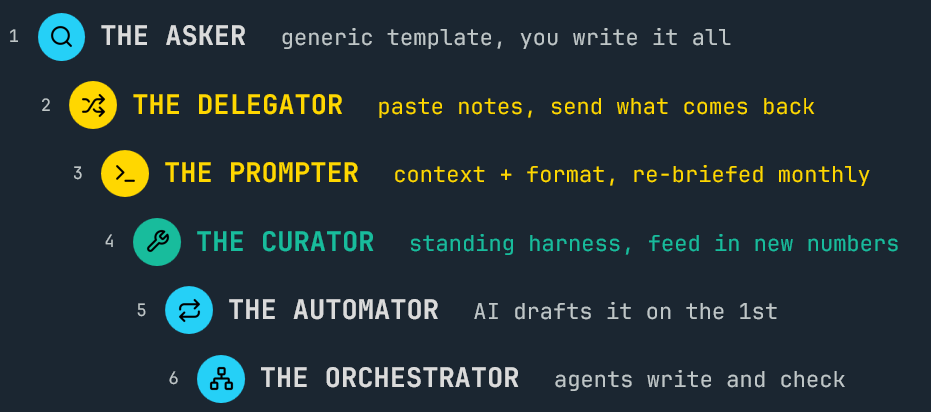
Levels 1 to 3: Asking, Delegating, Prompting
At level three, results become usable without an hour of fixing. The catch is that the prompt is not stored. Next month you start a new chat and explain the audience, the format and the word limit again. You are still the harness, just a faster one.
Level 4: The Jump to Curator
This is the step that matters. You stop repetitive prompting and build the harness once. It consists of three things in one place:
- Standing rules: for example, “lead with the biggest risk” and “never write on track without a number”.
- Reference examples: two or three reports that show what good looks like.
- A short glossary: your audience, your terms, your names.
You do not need to be a developer. While terminology might change, the principle is tool-agnostic. It applies to Claude, ChatGPT, etc. The tool matters less than having the harness live somewhere so you stop retyping it.
Levels 5 and 6: Automating and Orchestrating
At level five, the monthly draft arrives without you starting anything. A harness makes the report better, but it does not make the report necessary, so be careful what you automate.
At level six, several AIs work in roles and you act as editor-in-chief for your researcher, drafter, fact-checker, and proof-reader agents.
Every level above four runs on the same thing: your harness. The more AI does without you in the loop, the more context and guidelines decide the result.
A weak harness at level six is a very fast way to be wrong, which is why the design effort belongs at level four.
The Framework: Why, How, What
Before you build a harness, work through three questions in order.
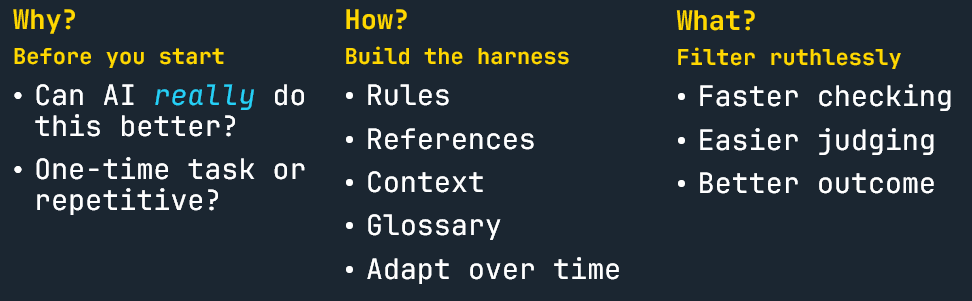
Why: Should You Use AI for This Task?
Ask two questions first.
- Can AI actually do this better than I can? Some things you should keep doing yourself. Not everything needs AI.
- Is this a one-time task or a recurring one? For a one-time task, do not build anything. For a task that returns daily, weekly or monthly, a harness pays for itself every time you use it afterwards.
Most people open the tool first and find out later whether it was worth it. Asking first costs a minute.
How: Build the Harness
A harness has four elements.
- Standing rules: the things that never change, such as voice, non-negotiables and format. Every rule is a correction you never have to make again.
- Reference examples: two or three pieces of work you are proud of. With examples attached, the AI stops guessing what “professional tone” means and matches your actual standard.
- Context and glossary: company and brand names, acronyms, background, who you are and who your customers are. This is everything an onboarding intern would otherwise ask every morning.
- A living document: when you correct the same thing twice, add a new rule, example or glossary entry. The harness improves with use instead of you repeating yourself.
Rules and examples are your guidelines. Context and glossary are your context. Elements one to three are the harness on day one, and the fourth is what keeps it improving. Updating it by hand works. Self-learning setups that update it for you exist, but they are a separate topic.
You do not need all of it on day one. Start with one task, define two or three rules, add two examples and a short glossary. Version one will be rough, and version two will be better because you only fix what annoyed you.
A prompt is a sentence you type. A harness is a system you keep.
What: Decide What to Keep
Only now do you look at the result. With a harness, you are no longer choosing between six versions. You review one that starts from your standard, and you check it against a written standard instead of your memory. You have three options:
- Keep it.
- Fix one thing.
- Throw it away. If the same thing keeps going wrong, update the harness.
Start Now: How to Build Your First AI Harness
Pick one task you already do again and again, such as a status report, a project update, a call summary or a forecast. Then give it a harness:
- Write three rules.
- Add two examples of what good looks like.
- Add a short context: who it is for and which terms it needs to know.
- Store them where your AI can find them, and run the task.
It will not be perfect, but every fix you make, you make once. This is more work than a single prompt, but only once. After that, you get time back every time you use it.
FAQ
What is a harness in the context of AI?
A harness is the context (background, audience, terms) and the guidelines (rules, examples, format) that you set up once around an AI tool, so it starts from your standard instead of a generic average. This is the end-user meaning. Among engineers, the term also describes the software around a model, such as the loop, tools and memory.
How is a harness different from a good prompt?
A prompt is typed per request, and you retype it every time. A harness is stored in a reusable place, such as a Claude Project or a ChatGPT custom GPT, and it improves each time you add a rule or example.
Do I need to be a developer to build one?
No. A harness consists of a few well-written documents: standing rules, two or three reference examples, and a short glossary. Use whichever tool your company already pays for.
Is a harness worth it for every task?
No. For a one-time task, do the work directly. A harness pays off for tasks that come back daily, weekly or monthly, and only where AI can actually do the task better than you can.
Does a harness make AI output fully reliable?
No. You still review the result. The difference is that you review against a written standard, and the odds of a correct first result are higher, so you review less and trust more.